Quite a while ago now, I wrote a series of posts about how I edit photos using Picasa. Recently Picasa had an upgrade that added a bunch of great extra features and changed some of the original ones.
So this is an update:
How to add a Border to your Photographs in Picasa
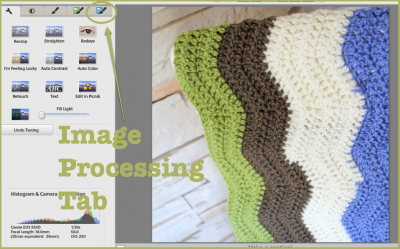
I used to add a border by creating a collage. (You can still do that using this tutorial.) But now you can add a border in the Image Processing Tab (with the blue button). So open your photo, then click the blue tab.
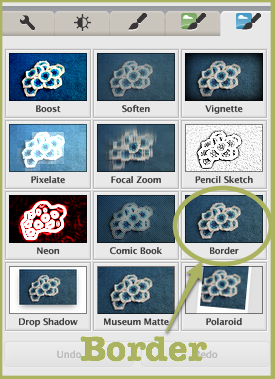
In that tab, choose the “Border” option.
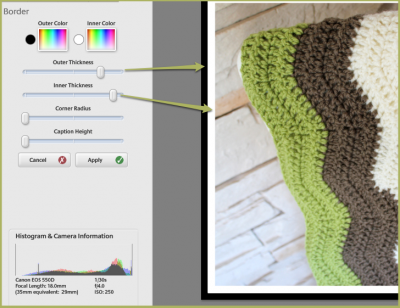
The new border button gives you great options. You have both an inner and outer border, and you can adjust the width of both. If you want only one border, just make both of them the same colour. To change the colour, click on the “rainbow” box near the top of the page. You can move the “dripper” over the colours in your photo to pick one of them or choose from the palette that pops up.
You can also adjust the space for the caption, and round the corners of the inner border and photo.
Once you’re happy with your adjustments, make sure you click “Apply” to save them. You have the option to “Undo” them later if you change your mind.
There are a few more new features in Picasa, but I’ll save them for another day. Have fun exploring!
Do you use Picasa? Which new features do you like?




Awesome tip. I haven’t really used borders in picasa yet, been going onto picnik or online picasa’s creative kit.
Thanks for this, just upgraded Picasa so I can now add borders, etc without having to go online.
I so need to embrace Picassa!
I’m just starting to play with some of the new features, Nikki. But it looks like fun!
PS sorry to here about your Pop this week
Thank you! I looked all over and didn’t see where to create borders. I use Picasa for makings buttons, Tshirt and poster designs. I need to add borders to shrink the image but keep the same image color. This works great.
I like being able to add borders.
Hi, do you know how to create a border just around the text on a picture?
Hi Katy,
If I were adding a box around the text on a picture, I would use Skitch. I can’t see any way to do it in Picasa.
I love adding borders, the rounded corners make my photos look a little warmer :). I would love to learn how to use the batch feature, i.e. add my watermark text and border to a bunch of photos in one go – would save me a heap of time. Any tips appreciated, best wishes, Carina
Hi,
Great tips.:)
If I create borders will I be able to have the text printed as well?
I tried printing a couple at Boots yesterday but the grey & text was greyed out.
I’m also having a hard time working out the colours, for example grey or white – I prefer white.
I’d really appreciate some tips on this.:)
Are you aware of any way to batch edit photos with adding a border? I haven’t quite figured it out yet.
I haven’t found a way to batch edit photos in Picasa either, Kerry.